Function RIGHT
TABLE OF CONTENTS
- How do I use RIGHT?
- Syntax
- Rules for the syntax
- Examples: RIGHT function in ERF
- Examples: RIGHT function in ECL
How do I use RIGHT?
The function RIGHT is used to specify the right most bytes of a string. It can be applied to alphanumeric source file fields, column references to alphanumeric columns, alphanumeric lookup fields, and alphanumeric constants. You specify the field name, column reference, or constant, and the length.
It can be used in assignments, and in comparisons with the string comparison operators.

Syntax
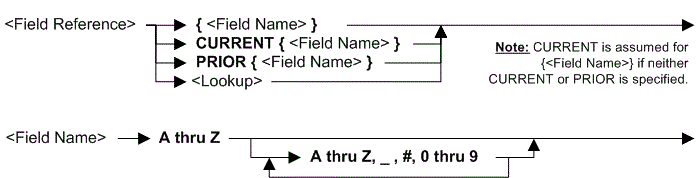
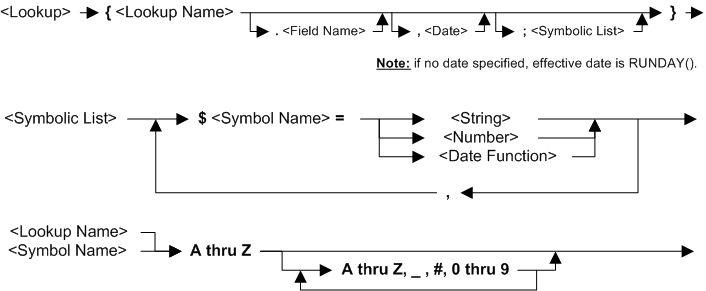
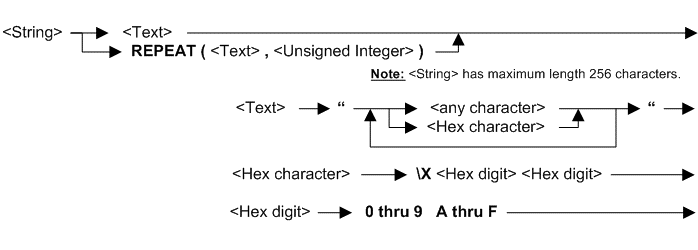
    ►►──RIGHT(─┬─<Field Reference>───┬─,─<Length>─)─────────►◄
               ├─<COL.nnn Reference>─┤
               └─<String>────────────┘

Rules for the syntax
The length is a positive integer and must be equal or less than the field, column or string length.
RIGHT can only be used in Extract Record Filter (ERF) and Extract Column Logic (ECL) text.
If used in an Extract Record Filter (ERF), the Column references COL.nnn can not be used.
RIGHT can be used in a comparison but only using the string comparison operators BEGINS_WITH, CONTAINS and ENDS_WITH.
See also topic: Rules for all Logic Text
Examples: RIGHT function in ERF
| Example logic text | Meaning |
|---|---|
| IF (RIGHT({field2},8) CONTAINS “AA”) THEN SELECT ENDIF |
Select only records where field2 has the characters “AA” somewhere in the last eight bytes. This example can also be written: SELECTIF(RIGHT({field2},8) contains “AA”) |
Examples: RIGHT function in ECL
| Example logic text | Meaning |
|---|---|
| COLUMN = RIGHT({Cust_Code},4) | Set the current column to the last four bytes of field Cust_Code. |
| COLUMN = RIGHT(COL.3,8) | Set the current column to the last eight bytes of column 3. This column must be after column 3. |
| IF (RIGHT({Cust_Code},8) CONTAINS “AA”) THEN WRITE(SOURCE=VIEW,DEST=EXT=03) ENDIF |
Write to extract 3 those records where the Cust_code contains “AA” anywhere in the last eight characters. |