Concatenation String Operator &
TABLE OF CONTENTS
- How do I use the concatenation operator &?
- Syntax
- Rules for the syntax
- Examples: Extract Column Logic with concatenation
How do I use the concatenation operator &?
The & operator is used to concatenate multiple strings into one column. You can use it to concatenate any combination of alphanumeric source file fields, column references to alphanumeric columns, and constants. Lookup fields are not supported.
The & operator can only be used in Extract Column Logic text.
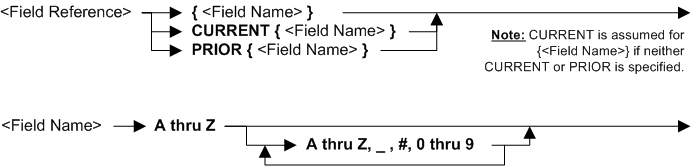
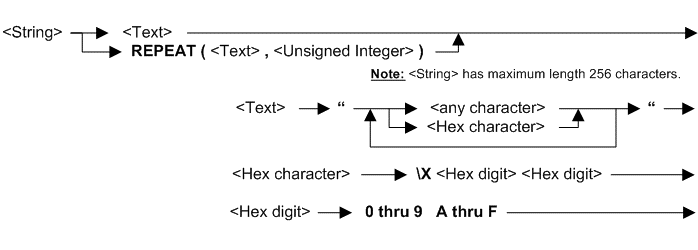
The syntax details of & are shown below.

Syntax
                               ┌────────────────────────────┐
                               ▼                            │
    ►►──┬─<Field Reference>───┬─── & ──┬─<Field Reference>────┼──────────────────►◄
        ├─<COL.nnn Reference>─┤        ├─<COL.nnn Reference>──┤
        └─<String>────────────┘        └─<String>─────────────┘

Rules for the syntax
Multiple fields and constants can be concatenated. The total length of the concatenated fields should not be greater than the column length.
The concatenation function & can be used in assignments.
The concatenation function & can not be used in comparisons.
& can only be used in Extract Column Logic text.
See also topic: Rules for all Logic Text
Examples: Extract Column Logic with concatenation
| Example logic text | Meaning |
|---|---|
| COLUMN = {field1} & {field2} & {field3} | Assign three concatenated fields to the column. |
| COLUMN = {field4} & “/” & {field5} & “/” & {field5} | Concatenate a combination of fields and constants and assign to the column. |
| COLUMN = COL.2 & “/” & COL.3 & “/” & COL.4 | Assign the values in columns 2, 3 and 4, delimited by “/”, to the current column. In this example the current column must be column 5 or greater. |